
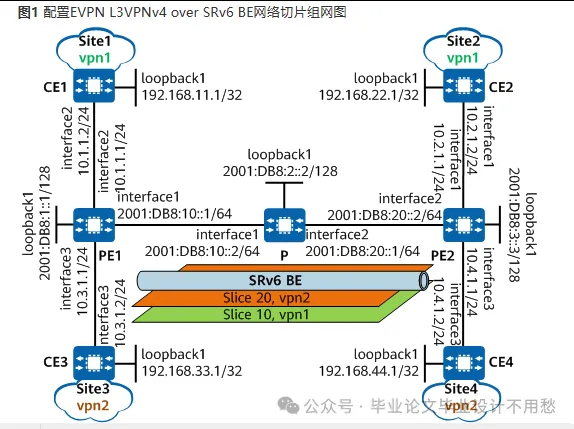
组网需求
该配置仅S6780-H、S6750-H、S6750-S、S6750E-S、S6730-H-V2、S6730E-H-V2、S5755-H、S5755E-H、S5755-S、S5732-H-V2系列支持。
如图1所示:PE1、P和PE2属于同一自治系统。在PE1和PE2之间通过建立双向SRv6 BE承载EVPN L3VPNv4业务。此外,为了满足保障CE1和CE2之间VPN实例vpn1的业务SLA,可以在公网上创建网络切片10,专门承载vpn1的业务;为了满足保障CE3和CE4之间VPN实例vpn2的业务SLA,可以在公网上创建网络切片20,专门承载vpn2的业务。
本例中interface1,interface2和interface3分别代表Vlanif100,Vlanif200和Vlanif300。
配置思路
采用如下的思路配置EVPN L3VPNv4 over SRv6 BE网络切片:
使能PE1、P和PE2各接口的IPv6转发能力,配置各接口的IPv6地址。
在PE1、P和PE2上使能OSPFv3。
在PE设备上配置EVPN L3VPN实例并将EVPN L3VPN实例绑定到接入侧接口。
在PE和CE之间建立EBGP对等体关系。
在PE设备之间建立BGP EVPN对等体关系。
在PE设备上配置SRv6 BE,配置OSPFv3的SRv6能力。
在PE1、P和PE2上创建网络切片实例,并配置基础接口。 在PE1和PE2上配置流策略,引流到切片。
操作步骤
使能各接口的IPv6转发能力,配置IPv6地址,以PE1为例,其他设备的配置过程相同,不再赘述。
[PE1] vlan batch 100 200 300[PE1] interface vlanif 100[PE1-Vlanif100] ipv6 enable[PE1-Vlanif100] ipv6 address 2001:DB8:10::1 64[PE1-Vlanif100] quit[PE1] interface 10ge 1/0/1[PE1-10GE1/0/1] port link-type access[PE1-10GE1/0/1] port default vlan 100[PE1-10GE1/0/1] quit[PE1] interface LoopBack 1[PE1-LoopBack1] ipv6 enable[PE1-LoopBack1] ipv6 address 2001:DB8:1::1 128[PE1-LoopBack1] quit
2.配置OSPFv3。
# 配置PE1。
[PE1] ospfv3 1[PE1-ospfv3-1] router-id 1.1.1.1[PE1-ospfv3-1] area 0 [PE1-ospfv3-1-area-0.0.0.0] quit[PE1-ospfv3-1] quit[PE1] interface vlanif 100[PE1-Vlanif100] ospfv3 1 area 0.0.0.0[PE1-Vlanif100] quit[PE1] interface loopback1[PE1-LoopBack1] ospfv3 1 area 0.0.0.0[PE1-LoopBack1] quit
# 配置P。
[P] ospfv3 1 [P-ospfv3-1] router-id 2.2.2.2[P-ospfv3-1] area 0[P-ospfv3-1-area-0.0.0.0] quit[P-ospfv3-1] quit[P] interface vlanif 100[P-Vlanif100] ospfv3 1 area 0.0.0.0[P-Vlanif100] quit[P] interface vlanif 200[P-Vlanif200] ospfv3 1 area 0.0.0.0[P-Vlanif200] quit[P] interface loopback1[P-LoopBack1] ospfv3 1 area 0.0.0.0[P-LoopBack1] quit
# 配置PE2。
[PE2] ospfv3 1[PE2-ospfv3-1] router-id 3.3.3.3[PE2-ospfv3-1] area 0 [PE2-ospfv3-1-area-0.0.0.0] quit[PE2-ospfv3-1] quit[PE2] interface vlanif 200[PE2-Vlanif200] ospfv3 1 area 0.0.0.0[PE2-Vlanif200] quit[PE2] interface loopback1[PE2-LoopBack1] ospfv3 1 area 0.0.0.0[PE2-LoopBack1] quit
配置完成后,可按如下指导检查OSPFv3是否配置成功。
# 显示OSPFv3邻居信息。以PE1为例。
[PE1] display ospfv3 peerOSPFv3 Process (1)Total number of peer(s): 1 Peer(s) in full state: 1OSPFv3 Area (0.0.0.0) Neighbor ID Pri State Dead Time Interface Instance ID 2.2.2.2 1 Full/Backup 00:00:37 Vlanif100 0
在PE设备上配置EVPN L3VPN实例并将EVPN L3VPN实例绑定到接入侧接口。
# 配置PE1。
[PE1] evpn-overlay enable[PE1] ip vpn-instance vpn1[PE1-vpn-instance-vpn1] ipv4-family[PE1-vpn-instance-vpn1-af-ipv4] route-distinguisher 100:1[PE1-vpn-instance-vpn1-af-ipv4] vpn-target 1:1 evpn[PE1-vpn-instance-vpn1-af-ipv4] quit[PE1-vpn-instance-vpn1] quit[PE1] ip vpn-instance vpn2[PE1-vpn-instance-vpn2] ipv4-family[PE1-vpn-instance-vpn2-af-ipv4] route-distinguisher 100:2[PE1-vpn-instance-vpn2-af-ipv4] vpn-target 2:2 evpn[PE1-vpn-instance-vpn2-af-ipv4] quit[PE1-vpn-instance-vpn2] quit[PE1] interface Vlanif 200[PE1-Vlanif200] ip binding vpn-instance vpn1[PE1-Vlanif200] ip address 10.1.1.1 24[PE1-Vlanif200] quit[PE1] interface Vlanif 300[PE1-Vlanif300] ip binding vpn-instance vpn2[PE1-Vlanif300] ip address 10.3.1.1 24[PE1-Vlanif300] quit[PE1] interface 10ge 1/0/2[PE1-10GE1/0/2] port link-type access[PE1-10GE1/0/2] port default vlan 200[PE1-10GE1/0/2] quit[PE1] interface 10ge 1/0/3[PE1-10GE1/0/3] port link-type access[PE1-10GE1/0/3] port default vlan 300[PE1-10GE1/0/3] quit[PE1] bgp 100[PE1-bgp] ipv4-family vpn-instance vpn1[PE1-bgp-vpn1] import-route direct[PE1-bgp-vpn1] advertise l2vpn evpn[PE1-bgp-vpn1] quit[PE1-bgp] ipv4-family vpn-instance vpn2[PE1-bgp-vpn1] import-route direct[PE1-bgp-vpn1] advertise l2vpn evpn[PE1-bgp-vpn1] quit[PE1-bgp] quit
# 配置PE2。
[PE2] evpn-overlay enable[PE2] ip vpn-instance vpn1[PE2-vpn-instance-vpn1] ipv4-family[PE2-vpn-instance-vpn1-af-ipv4] route-distinguisher 200:1[PE2-vpn-instance-vpn1-af-ipv4] vpn-target 1:1 evpn both[PE2-vpn-instance-vpn1-af-ipv4] quit[PE2-vpn-instance-vpn1] quit[PE2] ip vpn-instance vpn2[PE2-vpn-instance-vpn2] ipv4-family[PE2-vpn-instance-vpn2-af-ipv4] route-distinguisher 200:2[PE2-vpn-instance-vpn2-af-ipv4] vpn-target 2:2 evpn both[PE2-vpn-instance-vpn2-af-ipv4] quit[PE2-vpn-instance-vpn2] quit[PE2] interface Vlanif 100[PE2-Vlanif100] ip binding vpn-instance vpn1[PE2-Vlanif100] ip address 10.2.1.1 24[PE2-Vlanif100] quit[PE2] interface Vlanif 300[PE2-Vlanif300] ip binding vpn-instance vpn1[PE2-Vlanif300] ip address 10.4.1.1 24[PE2-Vlanif300] quit[PE2] interface 10ge 1/0/1[PE2-10GE1/0/1] port link-type access[PE2-10GE1/0/1] port default vlan 100[PE2-10GE1/0/1] quit[PE2] interface 10ge 1/0/3[PE2-10GE1/0/3] port link-type access[PE2-10GE1/0/3] port default vlan 300[PE2-10GE1/0/3] quit[PE2] bgp 100[PE2-bgp] ipv4-family vpn-instance vpn1[PE2-bgp-vpn1] import-route direct[PE2-bgp-vpn1] advertise l2vpn evpn[PE2-bgp-vpn1] quit[PE2-bgp] ipv4-family vpn-instance vpn2[PE1-bgp-vpn2] import-route direct[PE1-bgp-vpn2] advertise l2vpn evpn[PE2-bgp-vpn2] quit[PE2-bgp] quit
在PE与CE之间建立EBGP对等体关系。
# 配置CE1。
[CE1] interface loopback 1
[CE1-LoopBack1] ip address 192.168.11.1 32
[CE1-LoopBack1] quit
[CE1] bgp 65410
[CE1-bgp] router-id 192.168.11.1
[CE1-bgp] peer 10.1.1.1 as-number 100
[CE1-bgp] import-route direct
[CE1-bgp] quit
# 配置CE3。
[CE3] interface loopback 1
[CE3-LoopBack1] ip address 192.168.33.1 32
[CE3-LoopBack1] quit
[CE3] bgp 65430
[CE3-bgp] router-id 192.168.33.1
[CE3-bgp] peer 10.3.1.1 as-number 100
[CE3-bgp] import-route direct
[CE3-bgp] quit
# 配置PE1。
[PE1] bgp 100[PE1-bgp] router-id 1.1.1.1[PE1-bgp] ipv4-family vpn-instance vpn1[PE1-bgp-vpn1] peer 10.1.1.2 as-number 65410[PE1-bgp-vpn1] import-route direct[PE1-bgp-vpn1] quit[PE1-bgp] ipv4-family vpn-instance vpn2[PE1-bgp-vpn2] peer 10.3.1.2 as-number 65430[PE1-bgp-vpn2] import-route direct[PE1-bgp-vpn2] quit[PE1-bgp] quit
# 配置CE2。
[CE2] interface loopback 1[CE2-LoopBack1] ip address 192.168.22.1 32[CE2-LoopBack1] quit[CE2] bgp 65420[CE2-bgp] router-id 192.168.22.1[CE2-bgp] peer 10.2.1.1 as-number 100[CE2-bgp] import-route direct[CE2-bgp] quit
# 配置CE4。
[CE4] interface loopback 1[CE4-LoopBack1] ip address 192.168.44.1 32[CE4-LoopBack1] quit[CE4] bgp 65440[CE4-bgp] router-id 192.168.44.1[CE4-bgp] peer 10.4.1.1 as-number 100[CE4-bgp] import-route direct[CE4-bgp] quit
# 配置PE2。
[PE2] bgp 100[PE2-bgp] router-id 3.3.3.3[PE2-bgp] ipv4-family vpn-instance vpn1[PE2-bgp-vpn1] peer 10.2.1.2 as-number 65420[PE2-bgp-vpn1] import-route direct[PE2-bgp] ipv4-family vpn-instance vpn2[PE2-bgp-vpn2] peer 10.4.1.2 as-number 65440[PE2-bgp-vpn2] import-route direct[PE2-bgp-vpn2] quit[PE2-bgp] quit
配置完成后,在PE设备上执行display bgp vpnv4 vpn-instance peer命令,可以看到PE与CE之间的BGP对等体关系已建立,并达到Established状态。
以PE1与CE1的对等体关系为例:
[PE1] display bgp vpnv4 vpn-instance vpn1 peer BGP local router ID : 1.1.1.1 Local AS number : 100 VPN-Instance vpn1, Router ID 1.1.1.1: Total number of peers : 1 Peers in established state : 1 Peer V AS MsgRcvd MsgSent OutQ Up/Down State PrefRcv 10.1.1.2 4 65410 43 47 0 00:35:32 Established 1
在PE设备之间建立BGP EVPN对等体关系。
# 配置PE1。
[PE1] bgp 100[PE1-bgp] peer 2001:DB8:3::3 as-number 100[PE1-bgp] peer 2001:DB8:3::3 connect-interface loopback 1[PE1-bgp] l2vpn-family evpn[PE1-bgp-af-evpn] peer 2001:DB8:3::3 enable[PE1-bgp-af-evpn] quit[PE1-bgp] quit
# 配置PE2。
[PE2] bgp 100[PE2-bgp] peer 2001:DB8:1::1 as-number 100[PE2-bgp] peer 2001:DB8:1::1 connect-interface loopback 1[PE2-bgp] l2vpn-family evpn[PE2-bgp-af-evpn] peer 2001:DB8:1::1 enable[PE2-bgp-af-evpn] quit[PE2-bgp] quit
配置完成后,在PE设备上执行display bgp evpn peer命令,可以看到PE之间的BGP EVPN对等体关系已建立,并达到Established状态。
在PE设备之间建立SRv6 BE。
# 配置PE1。
[PE1] segment-routing ipv6[PE1-segment-routing-ipv6] encapsulation source-address 2001:DB8:1::1[PE1-segment-routing-ipv6] locator PE1 ipv6-prefix 2001:DB8:100:: 64 static 32[PE1-segment-routing-ipv6-locator] opcode ::100 end-dt4 vpn-instance vpn1 evpn[PE1-segment-routing-ipv6-locator] quit[PE1-segment-routing-ipv6] quit[PE1] ospfv3 1[PE1-ospfv3-1] segment-routing ipv6 locator PE1 auto-sid-disable[PE1-ospfv3-1] quit[PE1] bgp 100[PE1-bgp] l2vpn-family evpn[PE1-bgp-af-evpn] peer 2001:DB8:3::3 advertise encap-type srv6[PE1-bgp-af-evpn] quit[PE1-bgp] ipv4-family vpn-instance vpn1[PE1-bgp-vpn1] segment-routing ipv6 locator PE1 evpn[PE1-bgp-vpn1] segment-routing ipv6 best-effort evpn[PE1-bgp-vpn1] quit[PE1-bgp] quit
# 配置PE2。
[PE2] segment-routing ipv6[PE2-segment-routing-ipv6] encapsulation source-address 2001:DB8:3::3[PE2-segment-routing-ipv6] locator PE2 ipv6-prefix 2001:DB8:130:: 64 static 32[PE2-segment-routing-ipv6-locator] opcode ::200 end-dt4 vpn-instance vpn1 evpn[PE2-segment-routing-ipv6-locator] quit[PE2-segment-routing-ipv6] quit[PE2] ospfv3 1[PE2-ospfv3-1] segment-routing ipv6 locator PE2 auto-sid-disable[PE2-ospfv3-1] quit[PE2] bgp 100[PE2-bgp] l2vpn-family evpn[PE2-bgp-af-evpn] peer 2001:DB8:1::1 advertise encap-type srv6[PE2-bgp-af-evpn] quit[PE2-bgp] ipv4-family vpn-instance vpn1[PE2-bgp-vpn1] segment-routing ipv6 locator PE2 evpn[PE2-bgp-vpn1] segment-routing ipv6 best-effort evpn[PE2-bgp-vpn1] quit[PE2-bgp] quit
创建网络切片实例,并配置切片接口。# 以PE1为例,PE2配置类似。
[PE1] network-slice enable[PE1] network-slice protocol-number 251 [PE1] network-slice instance 10[PE1] network-slice instance 20[PE1] interface 10ge 1/0/1[PE1-10GE1/0/1]network-slice 10 flex-channel 1000[PE1-10GE1/0/1]network-slice 20 flex-channel 1000[PE1-10GE1/0/1] quit
# 配置P设备网络切片
[P] network-slice enable[P] network-slice protocol-number 251[P] network-slice instance 10[P] network-slice instance 20[P] interface 10ge 1/0/1[P-10GE1/0/1] network-slice 10 flex-channel 1000[P-10GE1/0/1] network-slice 20 flex-channel 1000[P-10GE1/0/1] quit[P] interface 10ge 1/0/2[P-10GE1/0/2] network-slice 10 flex-channel 1000[P-10GE1/0/2] network-slice 20 flex-channel 1000[P-10GE1/0/2] quit
配置流策略,引流到切片
# 配置PE1 ,PE2设备配置和PE1配置类似。
[PE1] traffic classifier c1[PE1-classifier-c1] if-match any[PE1-classifier-c1] quit[PE1] traffic behavior b1[PE1-behavior-b1] network-slice-instance 10[PE1-behavior-b1] quit[PE1] traffic policy p1[PE1-trafficpolicy-p1] classifier c1 behavior b1 precedence 5[PE1-trafficpolicy-p1] quit[PE1] traffic classifier c2[PE1-classifier-c2] if-match any[PE1-classifier-c2] quit[PE1] traffic behavior b2[PE1-behavior-b2] network-slice-instance 20[PE1-behavior-b2] quit[PE1] traffic policy p2[PE1-trafficpolicy-p2] classifier c2 behavior b2 precedence 5[PE1-trafficpolicy-p2] quit
应用流策略
以PE1为例,PE2设备配置逻辑相同。
[PE1]ip vpn-instance vpn1[PE1-vpn-instance-vpn1] traffic-policy p1 inbound[PE1-vpn-instance-vpn1] quit[PE1]ip vpn-instance vpn2[PE1-vpn-instance-vpn2] traffic-policy p2 inbound[PE1-vpn-instance-vpn2] quit
配置脚本
PE1
#sysname PE1# evpn-overlay enable #vlan batch 100 200 300 # ip vpn-instance vpn1 traffic-policy p1 inbound ipv4-family route-distinguisher 100:1 vpn-target 1:1 export-extcommunity evpn vpn-target 1:1 import-extcommunity evpn#ip vpn-instance vpn2 traffic-policy p2 inbound ipv4-family route-distinguisher 100:2 vpn-target 2:2 export-extcommunity evpn vpn-target 2:2 import-extcommunity evpn#traffic classifier c1 type or if-match any # traffic classifier c2 type or if-match any # traffic behavior b1 network-slice-instance 10 # traffic behavior b2 network-slice-instance 20 # traffic policy p1 classifier c1 behavior b1 precedence 5 #traffic policy p2 classifier c2 behavior b2 precedence 5 #network-slice instance 10network-slice instance 20#segment-routing ipv6 encapsulation source-address 2001:DB8:1::1 locator PE1 ipv6-prefix 2001:DB8:100:: 64 static 32 opcode ::100 end-dt4 vpn-instance vpn1 evpn#interface Vlanif100 ipv6 enable ipv6 address 2001:DB8:10::1/64 ospfv3 1 area 0.0.0.0#interface Vlanif200 ip binding vpn-instance vpn1 ip address 10.1.1.1 255.255.255.0#interface Vlanif300 ip binding vpn-instance vpn2 ip address 10.3.1.1 255.255.255.0#interface 10GE1/0/1 port link-type access port default vlan 100 network-slice 10 flex-channel 1000 network-slice 20 flex-channel 1000 #interface 10GE1/0/2 port link-type access port default vlan 200#interface 10GE1/0/3 port link-type access port default vlan 300#interface LoopBack1 ipv6 enable ipv6 address 2001:DB8:1::1/128 ospfv3 1 area 0.0.0.0#bgp 100 router-id 1.1.1.1 peer 2001:DB8:3::3 as-number 100 peer 2001:DB8:3::3 connect-interface LoopBack1 # ipv4-family unicast undo synchronization # ipv4-family vpn-instance vpn1 import-route direct advertise l2vpn evpn segment-routing ipv6 locator PE1 evpn segment-routing ipv6 best-effort evpn peer 10.1.1.2 as-number 65410 # ipv4-family vpn-instance vpn2 import-route direct advertise l2vpn evpn segment-routing ipv6 locator PE1 evpn segment-routing ipv6 best-effort evpn peer 10.3.1.2 as-number 65430 # l2vpn-family evpn undo policy vpn-target peer 2001:DB8:3::3 enable peer 2001:DB8:3::3 advertise encap-type srv6#network-slice enable#ospfv3 1 router-id 1.1.1.1 segment-routing ipv6 locator PE1 auto-sid-disable area 0.0.0.0#network-slice protocol-number 251#return
P
#sysname P#vlan batch 100 200#network-slice instance 10network-slice instance 20#interface Vlanif100 ipv6 enable ipv6 address 2001:DB8:10::2/64 ospfv3 1 area 0.0.0.0#interface Vlanif200 ipv6 enable ipv6 address 2001:DB8:20::1/64 ospfv3 1 area 0.0.0.0#interface 10GE1/0/1 port link-type access port default vlan 100 network-slice 10 flex-channel 1000 network-slice 20 flex-channel 1000#interface 10GE1/0/2 port link-type access port default vlan 200 network-slice 10 flex-channel 1000 network-slice 20 flex-channel 1000#interface LoopBack1 ipv6 enable ipv6 address 2001:DB8:2::2/128 ospfv3 1 area 0.0.0.0#network-slice enable#ospfv3 1 router-id 2.2.2.2 area 0.0.0.0#network-slice protocol-number 251return
PE2
#sysname PE2#evpn-overlay enable # vlan batch 100 200 300#network-slice instance 10network-slice instance 20#ip vpn-instance vpn1 traffic-policy p1 inbound ipv4-family route-distinguisher 200:1 vpn-target 1:1 export-extcommunity evpn vpn-target 1:1 import-extcommunity evpn#ip vpn-instance vpn2 traffic-policy p2 inbound ipv4-family route-distinguisher 200:2 vpn-target 2:2 export-extcommunity evpn vpn-target 2:2 import-extcommunity evpn#traffic classifier c1 type or if-match any # traffic classifier c2 type or if-match any # traffic behavior b1 network-slice-instance 10 # traffic behavior b2 network-slice-instance 20 # traffic policy p1 classifier c1 behavior b1 precedence 5 #traffic policy p2 classifier c2 behavior b2 precedence 5 #network-slice instance 10network-slice instance 20#segment-routing ipv6 encapsulation source-address 2001:DB8:3::3 locator PE2 ipv6-prefix 2001:DB8:130:: 64 static 32 opcode ::200 end-dt4 vpn-instance vpn1 evpn#interface Vlanif 100 ip binding vpn-instance vpn1 ip address 10.2.1.1 255.255.255.0#interface Vlanif 200 ipv6 enable ipv6 address 2001:DB8:20::2/64 ospfv3 1 area 0.0.0.0#interface Vlanif 300 ip binding vpn-instance vpn2 ip address 10.4.1.1 255.255.255.0#interface 10GE1/0/1 port link-type access port default vlan 100#interface 10GE1/0/2 port link-type access port default vlan 200 network-slice 10 flex-channel 1000 network-slice 20 flex-channel 1000#interface 10GE1/0/3 port link-type access port default vlan 300#interface LoopBack1 ipv6 enable ipv6 address 2001:DB8:3::3/128 ospfv3 1 area 0.0.0.0#bgp 100 router-id 3.3.3.3 peer 2001:DB8:1::1 as-number 100 peer 2001:DB8:1::1 connect-interface LoopBack1 # ipv4-family unicast undo synchronization # ipv4-family vpn-instance vpn1 import-route direct advertise l2vpn evpn segment-routing ipv6 locator PE2 evpn segment-routing ipv6 best-effort evpn peer 10.2.1.2 as-number 65420 # ipv4-family vpn-instance vpn2 import-route direct advertise l2vpn evpn segment-routing ipv6 locator PE2 evpn segment-routing ipv6 best-effort evpn peer 10.4.1.2 as-number 65440 # l2vpn-family evpn undo policy vpn-target peer 2001:DB8:1::1 enable peer 2001:DB8:1::1 advertise encap-type srv6#network-slice enable#ospfv3 1 router-id 3.3.3.3 segment-routing ipv6 locator PE2 auto-sid-disable area 0.0.0.0#network-slice protocol-number 251#return
CE1
#sysname CE1#vlan batch 200#interface Vlanif200 ip address 10.1.1.2 255.255.255.0# interface 10GE1/0/1 port link-type access port default vlan 200 #interface LoopBack1 ip address 192.168.11.1 255.255.255.255# bgp 65410 router-id 192.168.11.1 peer 10.1.1.1 as-number 100 # ipv4-family unicast undo synchronization import-route direct peer 10.1.1.1 enable# return
CE2
#sysname CE2#vlan batch 100#interface Vlanif100 ip address 10.2.1.2 255.255.255.0# interface 10GE1/0/1 port link-type access port default vlan 100 #interface LoopBack1 ip address 192.168.22.1 255.255.255.255#bgp 65420 router-id 192.168.22.1 peer 10.2.1.1 as-number 100 # ipv4-family unicast undo synchronization import-route direct peer 10.2.1.1 enable#return
CE3
#sysname CE3#vlan batch 300#interface Vlanif300 ip address 10.3.1.2 255.255.255.0# interface 10GE1/0/1 port link-type access port default vlan 300#interface LoopBack1 ip address 192.168.33.1 255.255.255.255#bgp 65430 router-id 192.168.33.1 peer 10.3.1.1 as-number 100 # ipv4-family unicast undo synchronization import-route direct peer 10.3.1.1 enable#return
CE4
#sysname CE4#vlan batch 300#interface Vlanif300 ip address 10.4.1.2 255.255.255.0# interface 10GE1/0/1 port link-type access port default vlan 300#interface LoopBack1 ip address 192.168.44.1 255.255.255.255#bgp 65440 router-id 192.168.44.1 peer 10.4.1.1 as-number 100 # ipv4-family unicast undo synchronization import-route direct peer 10.4.1.1 enable#return

 微信扫一扫,打赏作者吧~
本文链接:https://www.jingber.cn/post/3792.html 转载需授权!

